


Download 3A PDF to Word Batch Converter – Free PDF to Word Conversion Tool for Windows, Mac, Android & iOS
Transform your PDF documents into fully editable Word files with 3A PDF to Word Batch Converter—a powerful, secure, and user-friendly software designed for professionals, students, and everyday users. This free PDF to Word converter allows you to convert multiple PDFs at once while preserving original formatting, images, tables, and layout. Whether you're working on academic papers, business reports, or legal documents, this tool ensures a seamless transition from static PDFs to dynamic DOC and DOCX files. With support for batch processing, customizable output settings, and compatibility across Windows, Mac, Android, and iOS, it’s the ultimate solution for efficient document management. The intuitive interface makes it easy to use, even for beginners, while advanced options give power users full control over conversion quality and output precision.
Key Features of 3A PDF to Word Batch Converter
3A PDF to Word Batch Converter stands out in the crowded field of document conversion tools thanks to its robust feature set. One of the most impressive capabilities is its ability to convert entire PDFs—including embedded images, charts, tables, and complex layouts—into editable Word documents without losing formatting. This is especially valuable for users who need to revise or repurpose content from PDFs, such as research papers or technical manuals. The software supports batch conversion, allowing you to process multiple files simultaneously, which dramatically reduces time compared to converting files one by one.
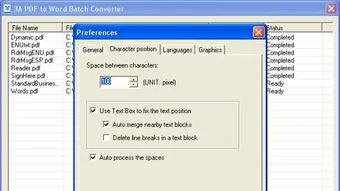
Another standout feature is the customizable output settings. You can adjust the zoom level to ensure high-quality image rendering, set the number of pages to convert, and fine-tune character spacing for better readability. These options are particularly useful when dealing with scanned PDFs or documents with dense text. The tool also maintains hyperlinks, bookmarks, and headers/footers, ensuring that your converted Word files remain professional and well-structured.
Additionally, 3A PDF to Word Batch Converter is secure and privacy-focused. Your documents are processed locally—no files are uploaded to external servers—making it ideal for handling sensitive or confidential information. The software is also lightweight and doesn’t consume excessive system resources, ensuring smooth performance even on older machines. Whether you're on a Windows PC, Mac, Android tablet, or iOS device, you can access this tool with consistent performance and reliability.
How to Install and Use 3A PDF to Word Batch Converter
Getting started with 3A PDF to Word Batch Converter is quick and hassle-free. First, download the software from the official website. The installer is available for Windows (7/8/10/11), Mac (OS X 10.10 and later), and mobile platforms like Android and iOS. The installation process is straightforward—simply run the downloaded file, follow the on-screen prompts, and complete the setup in under a minute.
Once installed, launch the application. You’ll be greeted by a clean, intuitive interface that makes navigation easy. To begin converting, click “Add Files” and select one or more PDFs from your computer or device.
You can also drag and drop files directly into the window. Next, choose your output format—either DOC or DOCX—and customize settings such as zoom level, page range, and character spacing. For advanced users, the tool offers options to preserve text flow, handle font embedding, and maintain document structure.
After configuring your preferences, click “Convert” to start the batch processing. The software will display a progress bar and notify you when the conversion is complete. Converted files are saved to your chosen folder, ready for editing in Microsoft Word, Google Docs, or any other word processor. The entire process is automated, requiring minimal user input, which makes it perfect for users who need to convert dozens of files daily.
Compatibility and System Requirements
3A PDF to Word Batch Converter is designed for broad accessibility and compatibility across modern operating systems. It runs smoothly on Windows 7 and later, including the latest Windows 11 updates, ensuring that both desktop users and enterprise environments can benefit from its features. For Mac users, the software supports macOS 10.10 (Yosemite) and higher, making it compatible with most Apple devices currently in use.
Mobile users aren’t left out either. The Android version is available on Google Play, and the iOS app can be downloaded from the App Store, offering on-the-go conversion for PDFs stored in cloud services or local storage. This cross-platform availability means you can convert documents whether you’re at your desk, on a tablet, or using your smartphone.
System requirements are modest, ensuring that the software runs efficiently even on older or low-end devices. For desktops, you’ll need at least 1 GB of RAM and 50 MB of free disk space. The mobile versions require minimal storage and operate well on devices with 2 GB of RAM or more. The software doesn’t require an internet connection to function, making it ideal for offline use and enhancing data privacy. Regular updates are released to improve performance, fix bugs, and add new features—ensuring long-term usability and compatibility with evolving file formats.
Pros and Cons of 3A PDF to Word Batch Converter
- Pros:
- Supports batch conversion of multiple PDFs at once
- Preserves original formatting, images, tables, and layout
- Highly customizable output settings (zoom, spacing, page range)
- Secure—processes files locally with no cloud upload
- Available for Windows, Mac, Android, and iOS
- Free to download and use with no hidden fees
- Lightweight and fast, even on older systems
- Cons:
- Advanced features may require a learning curve for absolute beginners
- Limited support for heavily encrypted or password-protected PDFs
- No built-in OCR for scanned PDFs (though it works well with text-based PDFs)
- Mobile versions lack some desktop-level customization options
- Free version includes occasional ads (optional premium upgrade available)
Frequently Asked Questions (FAQ)
- Is 3A PDF to Word Batch Converter free to use?
-
Yes, the 3A PDF to Word Batch Converter is completely free to download and use. There are no subscription fees or hidden charges. While the free version includes ads, it offers full functionality for most users. A premium version is available for those who want advanced features like OCR support and ad-free experience.
- Can I convert scanned PDFs to Word using this tool?
-
3A PDF to Word Batch Converter works best with text-based PDFs. For scanned PDFs, the tool may not extract text accurately unless OCR (Optical Character Recognition) is enabled. However, the software does not currently include built-in OCR. For scanned documents, consider using a tool with OCR integration or converting the PDF to a searchable format first.
- Does the software support batch processing?
-
Absolutely. One of the standout features is batch conversion. You can select multiple PDF files at once and convert them into DOC or DOCX format in a single operation. This saves significant time when managing large volumes of documents.
- Is my data safe when using this tool?
-
Yes, your documents are processed entirely on your device. The software does not upload files to external servers, ensuring your data remains private and secure. This makes it ideal for handling sensitive or confidential documents.
- Can I use it on my Android or iOS device?
-
Yes, 3A PDF to Word Batch Converter is available for both Android and iOS. You can download the app from the Google Play Store or Apple App Store and convert PDFs directly from your smartphone or tablet.
Conclusion: Why You Should Download 3A PDF to Word Batch Converter Today
If you frequently work with PDF documents and need to edit them in Word, 3A PDF to Word Batch Converter is a must-have tool. Its ability to convert multiple files at once while preserving formatting, images, and layout makes it a top choice for students, professionals, and content creators. With support for Windows, Mac, Android, and iOS, it offers unmatched flexibility and convenience. The software is secure, fast, and free to use—making it an excellent value for anyone looking to streamline their workflow.
Whether you're converting research papers, invoices, or marketing materials, this tool simplifies the process without compromising quality. The intuitive interface ensures a smooth experience, while customizable options give you full control over the output. With regular updates and strong cross-platform support, 3A PDF to Word Batch Converter continues to evolve to meet user needs.
Download 3A PDF to Word Batch Converter now and experience effortless, secure, and high-quality document conversion. Transform your PDFs into editable Word files in seconds—no hassle, no cost, just results.







